
The photos that stayed up
Before I built my request desk, a client mentioned at the end of a call that some old photos on their site needed to come down. Easy. I said no worries, I'd handle it right after we hung up.
I didn't. I think I did it in my head, which felt so much like doing it that I moved on. Days later a text came in: the old photo was still live.
It turned out fine. I said it was my fault, fixed it, and nobody lost sleep. But it bothered me for longer than the fix took, because of what it says to a client. If a two-minute change can slip, what about the big things? That request lived in exactly one place, my memory, and nobody could see it there, including me.
A room that doesn't fly anything
The first American spaceflights were run from Mercury Control at Cape Canaveral. Gene Kranz, who later became one of NASA's best-known flight directors, remembered it as a room with only two TVs. In June 1965, Gemini 4 became the first flight run from the new Mission Control Center in Houston, in Building 30 at what is now Johnson Space Center (NASA). The new room was much bigger, the computers were faster, and specialists sat in support rooms right next door.
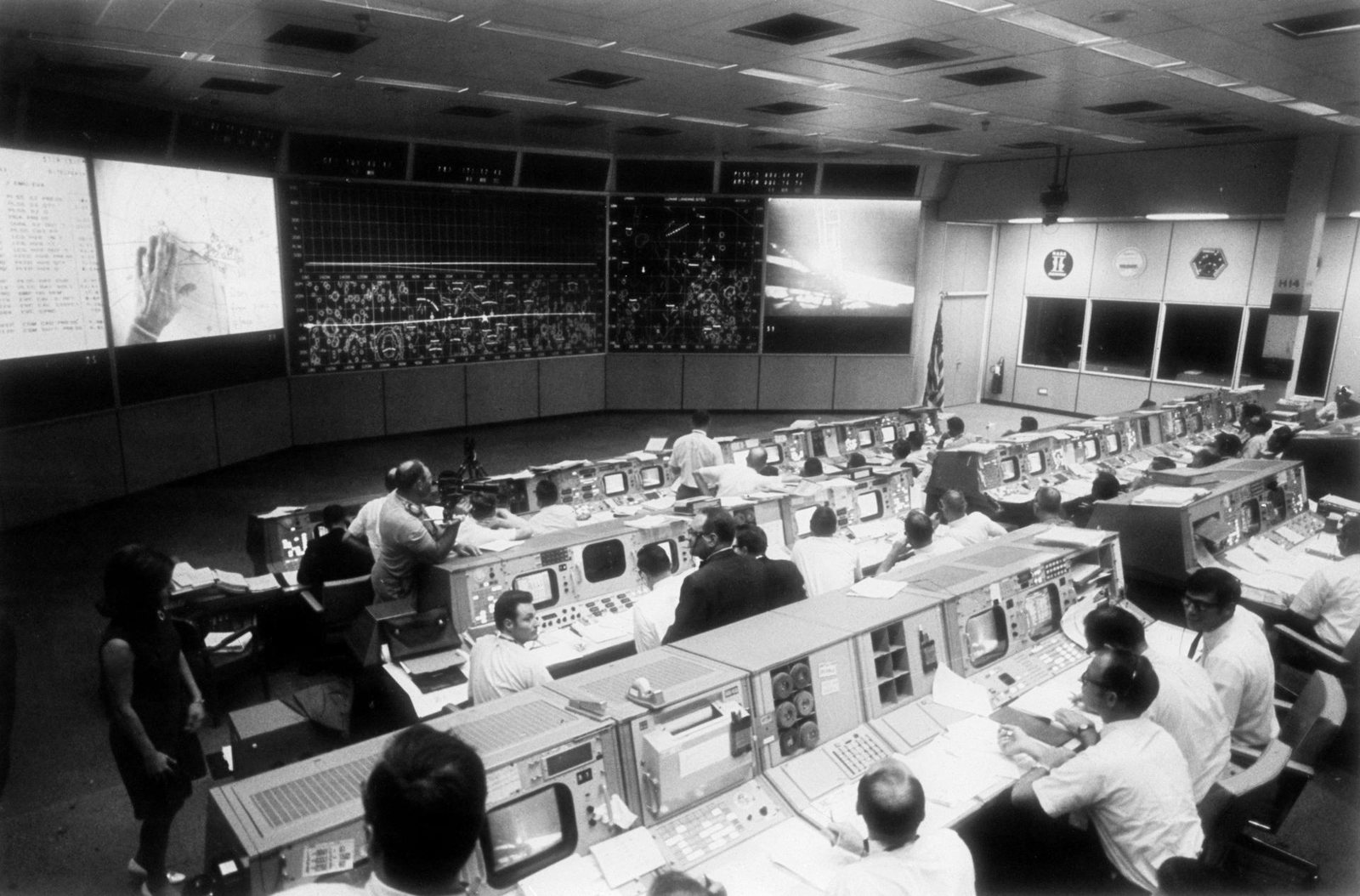
Mission Control during the Apollo 11 moonwalk, July 20, 1969. NASA photo S69-39593, public domain (source).
Each console belonged to one job. The front row, which controllers called "the trench," was Booster, Retro, FIDO and Guidance. The flight director sat near the back and owned the decisions. Telemetry from the spacecraft was pumped onto the screens at each console, and the specialists in the back rooms watched the same numbers on the same kind of console.
The National Park Service's landmark nomination for the room describes what the staff there did: they assessed the spacecraft's status and decided whether the flight would continue, change or stop (NPS). Nobody in that description touches a joystick. The room's whole job was to make the state of the mission visible to the people who had to act on it. (The room still exists. NASA restored it to its Apollo look in 2019, and it's been a National Historic Landmark since 1985: NASA.)
If you've read Mercury, Gemini, Apollo, you know I like this era for how NASA broke an impossible goal into small, testable steps. This note is about the other half of that story: how a room full of people knew where they stood.
Go or no-go
Before every big moment, the flight director polled the room. Before Apollo 11 started its powered descent to the Moon, Kranz went console by console: Retro, FIDO, Guidance, Control, TELMU, GNC, EECOM, the flight surgeon. Every one said go (Apollo Lunar Surface Journal).
About ten minutes later, the lander's computer threw a 1202 alarm. In a back room, Jack Garman told the guidance officer, Steve Bales, that it was fine as long as it didn't keep happening, and Bales called go to the flight director. Charlie Duke, the astronaut on the radio, passed it up to Armstrong and Aldrin. Three minutes after that came the line everyone was waiting for: "You're Go for landing."
From Armstrong reporting the alarm to Duke saying they were go on it took about twenty seconds. It worked because each person knew exactly what they were responsible for and had the information in front of them, so nobody had to ask around. The poll was one question, asked of each person, with the evidence already on their screen.
"Let's not make it any worse by guessing"
The best-known test of that room came in April 1970. Fifty-five hours into Apollo 13, an oxygen tank blew up in the service module. Jack Swigert radioed down, "Okay, Houston, we've had a problem here," and Jim Lovell repeated it a moment later (NASA).
On the flight loop, Kranz told his team to stop guessing, and they worked from what the numbers showed. The lunar module became a lifeboat. A controller named John Aaron was put in charge of power, and he talked about the spacecraft's data as "visibility": the thing you needed in order to know what was going on. When carbon dioxide started building up, engineers on the ground figured out how to fit the command module's square filter canisters into the lunar module's round system with a suit hose, plastic bags, a cue card and duct tape. They tested it on the ground and read the steps up to the crew (NASA).
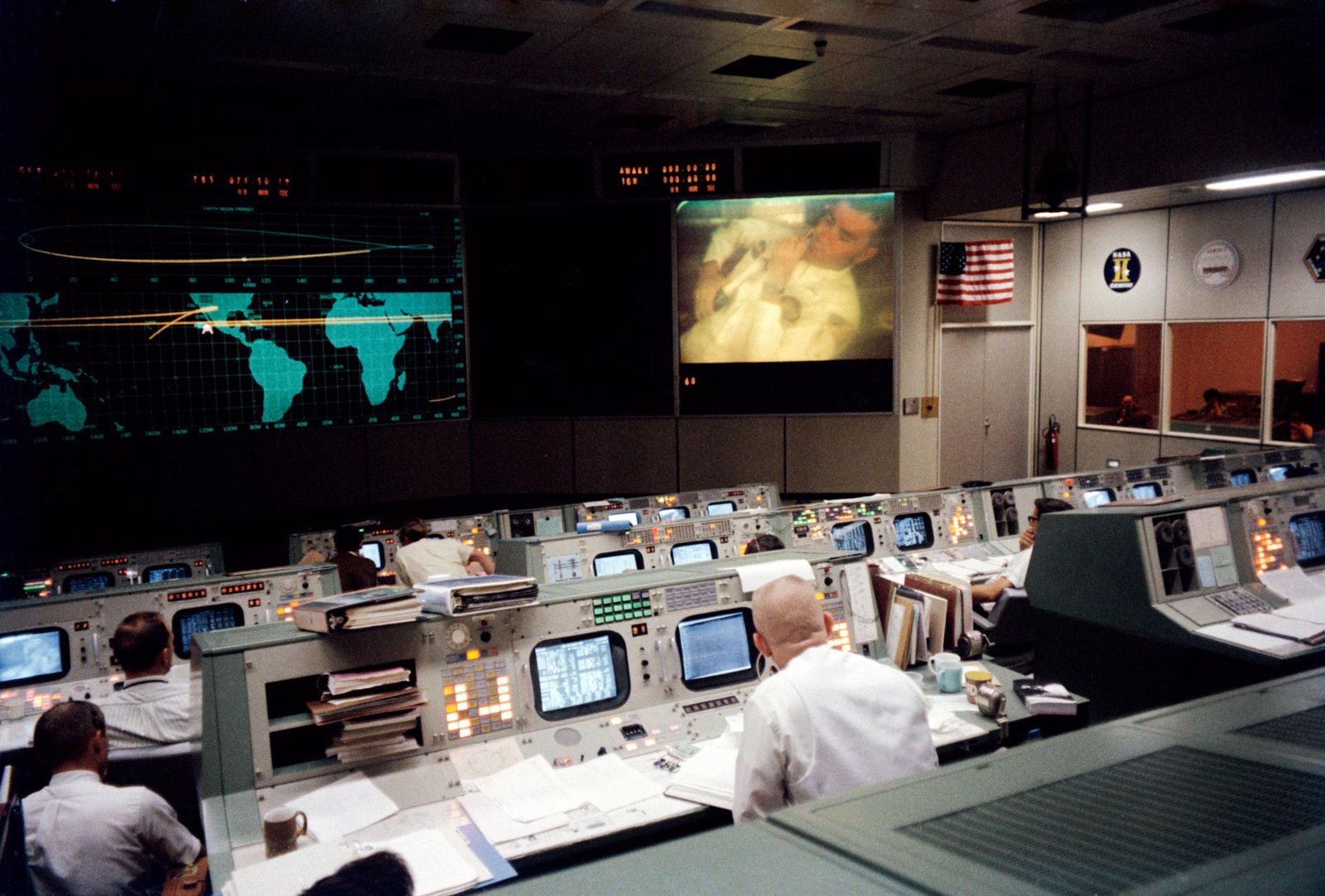
Gene Kranz (foreground, back to camera) during Apollo 13's fourth TV broadcast, shortly before the accident. NASA photo S70-35139, public domain (source).
Kranz worked those shifts in a white vest his wife, Marta, sewed for him; the Smithsonian has the Apollo 13 one (National Air and Space Museum). I love that detail: a room built around screens and numbers, and one of the objects the Smithsonian kept from it was sewn by hand.
There are plenty of inspiring lines about that week. What I take from it is plainer. The crew came home because the people on the ground could see the problem clearly enough to solve it.
Five inboxes and a spreadsheet
Here's what most small businesses I work with have instead. Requests come in by email, text, phone, a contact form, a comment at the end of a meeting. Status lives in someone's head. Hours live in a spreadsheet that's correct on the day somebody updates it. The client can't see any of it, so they do the only thing they can: they ask. "Did you get my email?" "Any update?" "How many hours do we have left?"
None of those are bad questions. They're what a person asks when they have no screen to look at. My missed photo was the same problem from my side: no screen meant nothing reminded me.
So when I built the request desk for my care plans, I designed it around the question each person needs answered. I started with ideas and wireframes, then designed both sides in Figma, then wrote the code by hand. You can read the full story on the Mission Control mission page. Here I want to show what the screens are for. Every business in these screenshots is made up.
What needs me next?
My side of the desk is a tracker. The part I use most is a small panel called Needs you, my version of the go/no-go poll. It asks the whole list a handful of questions and shows how many tickets answer yes: urgent and still open, new and not started, a client replied, waiting on a client for three days or more, an estimate that's bigger than the hours left on the plan.
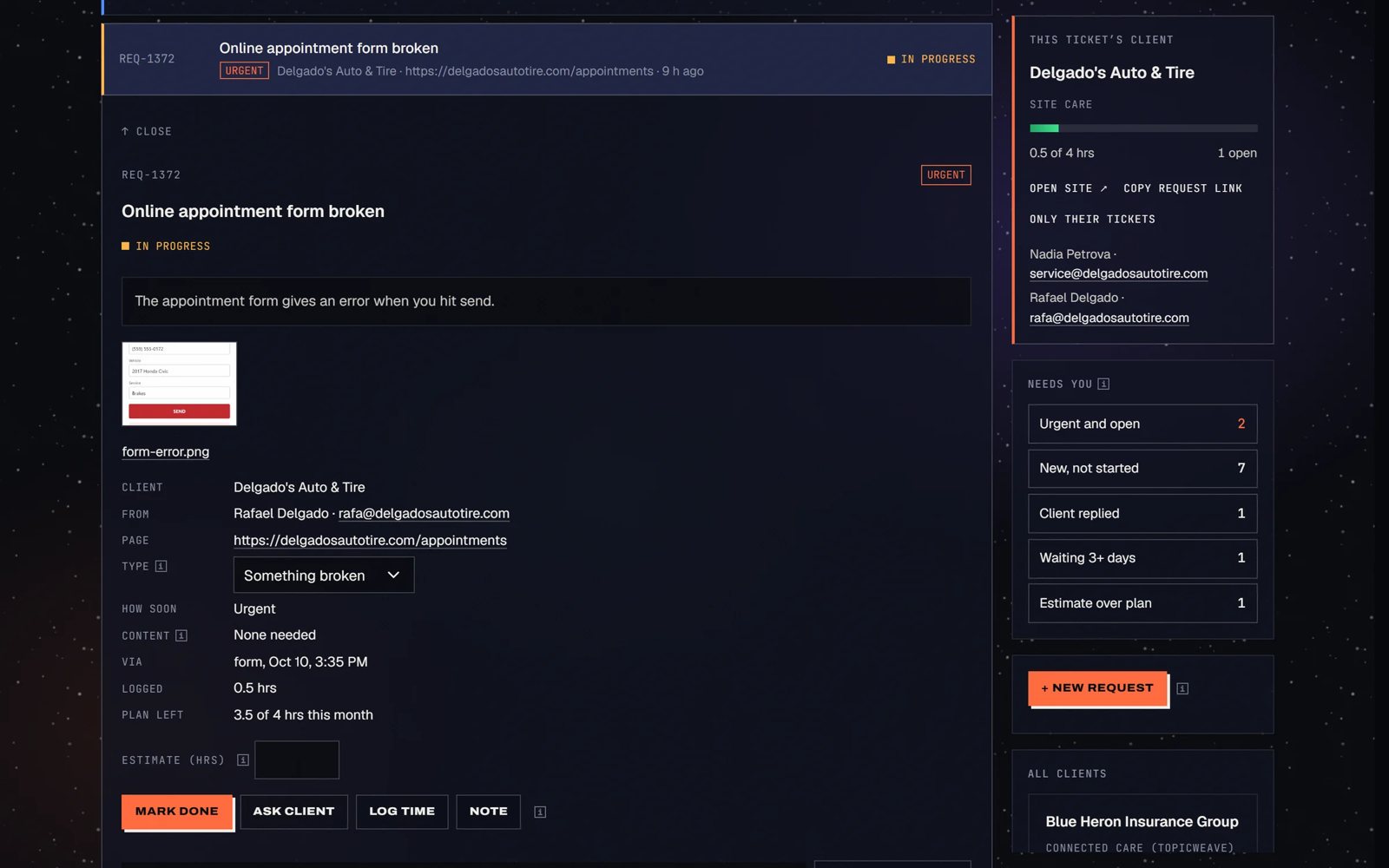
My tracker, with demo data. Needs you shows 2 urgent and open, 7 new, 1 client reply, 1 waiting 3+ days and 1 estimate over plan.
"Client replied" is the one I'd have needed for the photos. It flags any ticket where the client wrote back after I asked them something. In the old world, that reply would sit in an inbox until I happened to scroll past it. And a request mentioned on a call doesn't live in my head anymore. I log it as a ticket while we're still talking, and it gets a number like everything else.
A view for the people who are waiting
The flight controllers each had their own console, but the room also had big shared screens at the front that everybody could see. My clients get the shared screen.
Every request gets a status page with a private link, and clients don't need a password to open it. It shows where the request stands (received, in progress, waiting on you, done), and if I've asked a question, they can answer right there or just reply to the email.
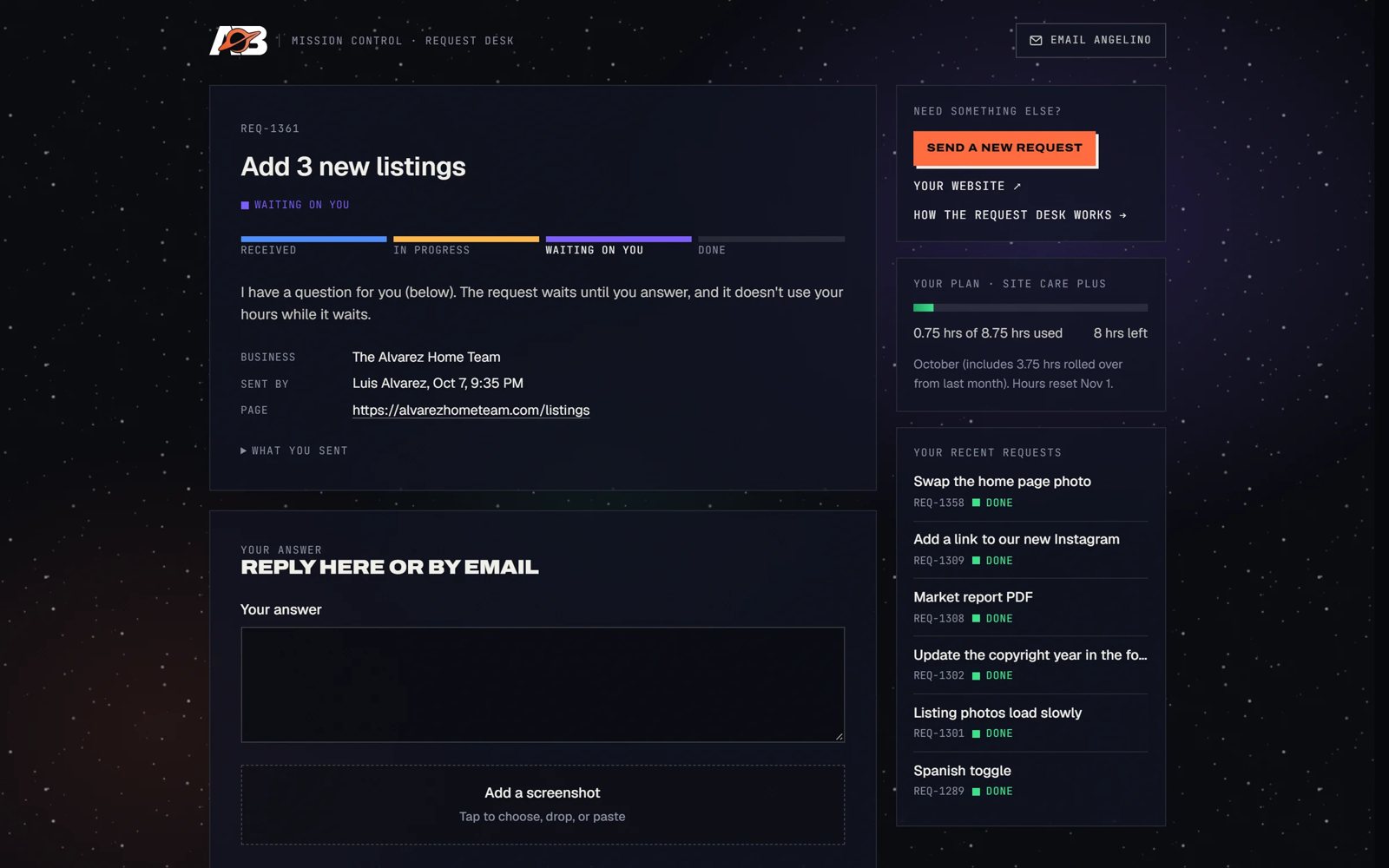
A status page for a made-up real estate team. It says the request is waiting on them and that it doesn't use their hours while it waits.
The sidebar is where the bigger questions get answered. In this demo, the client has used 0.75 of their 8.75 hours this month, with 8 left, including 3.75 that rolled over from last month. Below that are their recent requests, all marked done. Nobody has to email me to find any of that out.
I write those pages in the plainest words I can. "We're looking into it" on a status page leaves the client exactly where an unanswered email did. I wrote about that kind of polite fog in 1984 on the web.
Hours you can see, and the time I didn't charge
The desk also shows something most retainers hide: the work that didn't count. Every bit of time I log is tagged as plan hours, no charge, an included fix or a monthly check. Only plan hours come off the balance. The monthly report, which goes out in each client's own logo and colors, shows the free time next to the paid time.
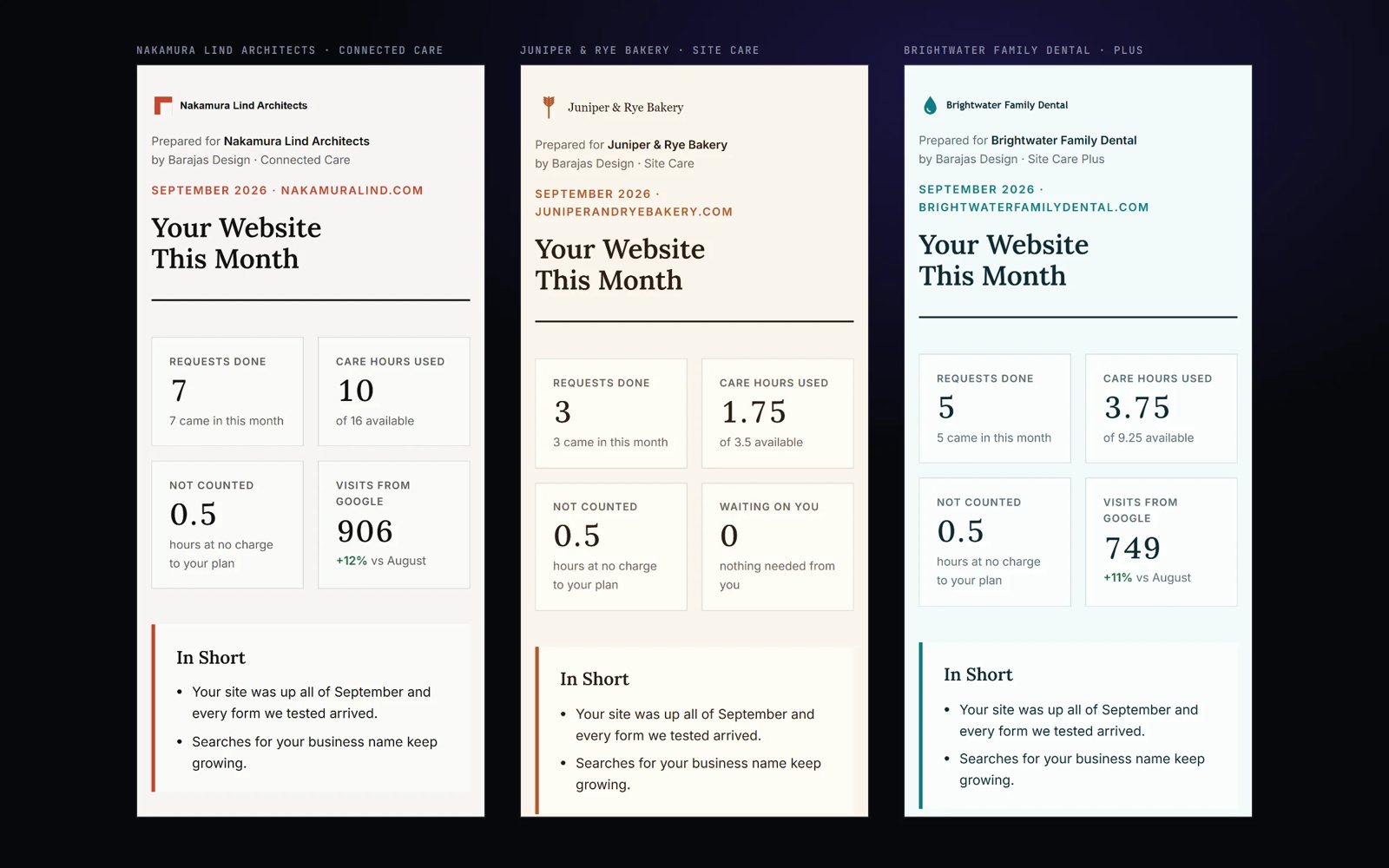
Three demo reports. The made-up bakery had 3 requests done, used 1.75 of 3.5 care hours, and got 0.5 hours that weren't counted.
I like this part because it answers a question clients rarely ask out loud: am I getting what I pay for? A number on a page answers that better than I could in an email.
There's one view only I see. A private tab compares each client's real hours over the last three and six months with every plan I offer. In the demo data, one made-up client used 160% of their plan, so the desk suggests the next tier up would cost them less than paying for extra hours. Two others used under 40% for three months straight, so a smaller plan might suit them better. I'd rather bring that up myself than wait for someone to notice they're overpaying.
Do you need one?
Maybe not. If one person handles everything and the volume is small, a good inbox habit and a shared spreadsheet go a long way. Airtable or Notion will carry you further than people expect.
A dashboard starts paying for itself when the state of your work lives in more places than one person can watch: several ways in, several people involved, clients who keep asking where things stand, hours or money you have to report on. That's the point where you need a room with screens. I build those as a service now, called Custom dashboards. A single-workflow dashboard for your own team starts at $9,500, and a full Mission Control with a client side starts at $18,000. The approach is the same one I used on the desk: map how the work moves today, design both sides in Figma, then build it. The same idea runs through the owner side of Topicweave, where nothing gets published until the owner approves it on one screen.
If you're not sure, start with the question from the top of this note. Can you say, right now, what needs you next? If the answer means opening five apps, that's your gap.
The old photo would have been a ticket with a number, sitting in Needs you as new and not started, the moment I logged it on the call. I'd have seen it before the client did.